For Practitioners
Walk into every room with the chart already done up.
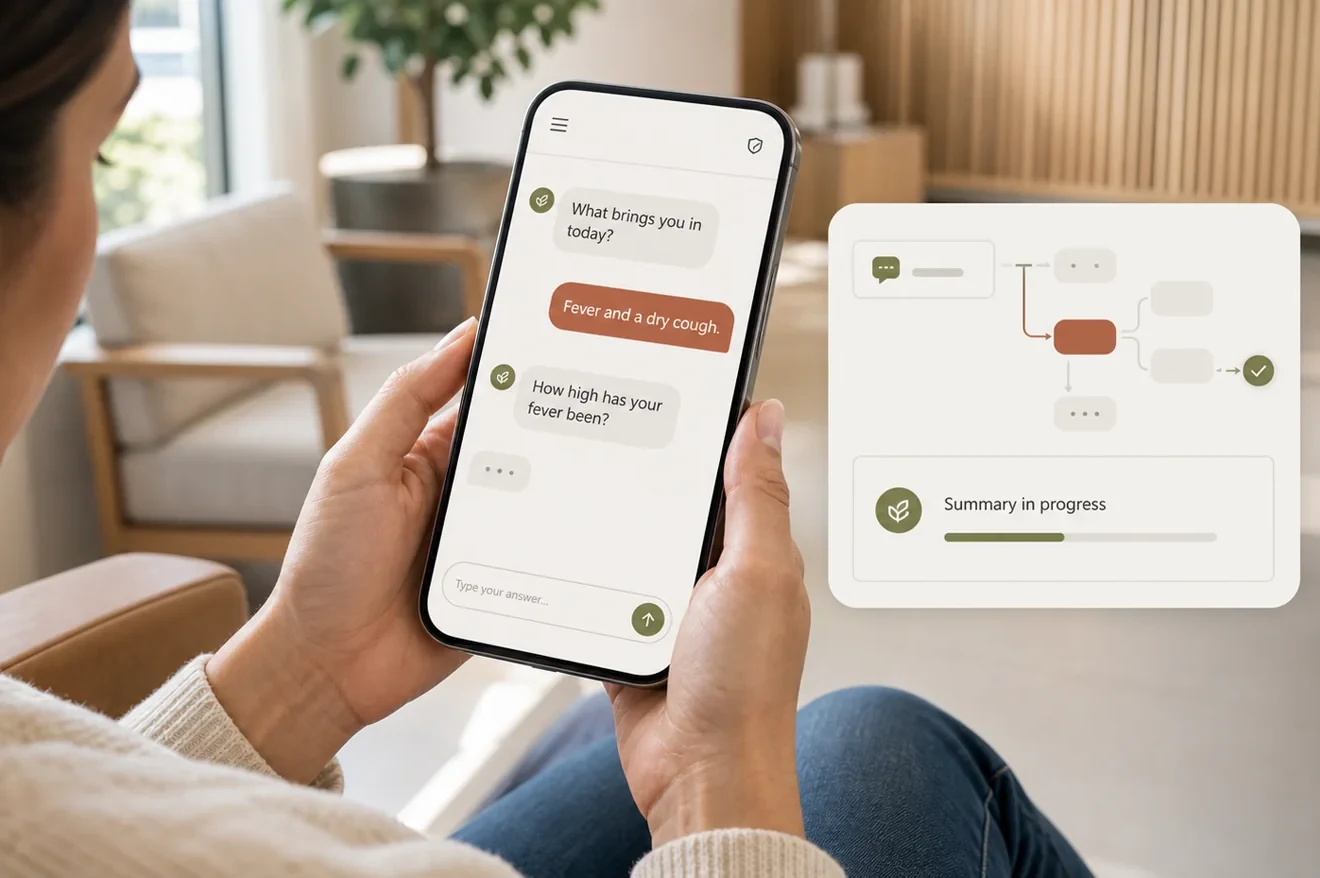
You trained to care for patients, not to chase labs across portals or retype intake answers into a chart. Moxcares brings conversational intake, structured labs, one-click documents, and AI charting onto the same spine — so the patient's story is already in the chart before you enter the room, and your notes are mostly finished before you leave it.

What hurts today
The everyday friction Moxcares takes off your plate
The chart is blank when the patient walks in
Intake happened somewhere else, labs live in another portal, and the fax from yesterday is still on the desk. You start the visit by gathering context that should have been assembled already.
Labs scatter across portals and PDFs
You open one tab for imaging, another for labs, a third for the EHR — and try to remember which value changed since last time. Trending takes longer than the visit itself.
Intake answers never make it into the chart
Patients fill forms, but the data sits in a separate intake tool. Staff re-key it, or nobody does, and you ask the same questions all over again at the door.
Templates and referrals are rebuilt from scratch
Every lab requisition, referral letter, and school note starts as a blank Word doc. The same format gets retyped dozens of times a week.
Charting eats your evening
By the time you open the EHR after the last patient, you're reconstructing the visit from memory. Notes get thinner, and your day gets longer.
Red flags hide in free text
An allergy, a medication interaction, or a severe symptom is buried in a paragraph nobody read until you opened the chart. The visit starts with a surprise.
What changes with Moxcares
Quieter days. Better visits. Less rework.
Intake flows straight into the chart
Conversational intake answers become structured chart data before the visit. Chief complaint, history, meds, and allergies — already in the right place.
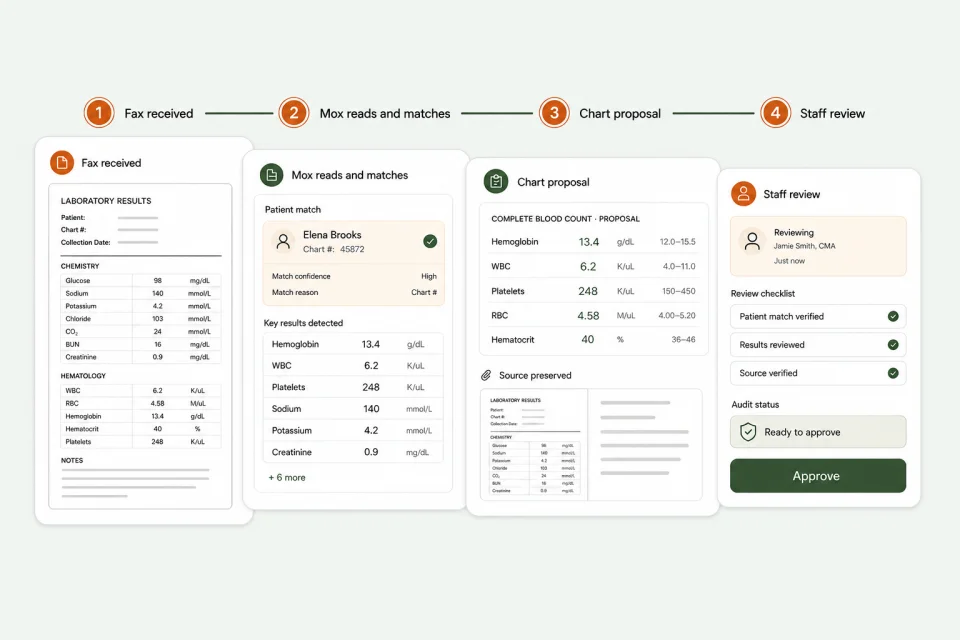
Labs pre-filed and trended
Results land structured in the chart, abnormal values highlighted, and trends visible at a glance. No more tab-juggling across portals.
One-click chart proposals
Mox drafts chart entries from intake, labs, and faxed reports. You review, accept, edit, or reject. Nothing lands in the chart without your say.
Templates and documents ready to go
Referrals, lab requisitions, labels, and patient instructions are prebuilt. Staff generate them from the chart in one click instead of retyping a Word doc.
AI scribe turns the visit into a SOAP note
Ambient listening drafts a structured note with problems, meds, assessment, and plan. Sign it as-is or edit inline — either way, you're done before the next room.
Post-visit replies close without you
Routine follow-ups are triaged and answered in your clinic's voice. Only the ones that need a clinician reach your queue — with full context attached.
A day with Moxcares
What a clinic day feels like
Pre-visit prep, in-room focus, and post-visit closure — with the chart, labs, and intake all flowing on one spine.
- Before the day starts
Your queue is already chart-ready
Each patient has a one-page summary built from intake, prior notes, and pre-filed labs. Three have flags. You know exactly which visits need extra time before you open the first door.
- In the room
You lead with a real question
'It sounds like the cough started Monday and got worse at night — is that right?' The patient feels heard. The chart already has the history, so you spend the visit diagnosing and connecting, not data-gathering.
- After the visit
Notes and instructions write themselves
The AI scribe drafts a structured SOAP note. Care instructions, follow-up plan, and the lab requisition generate from the chart in one click. You review and sign.
- Evening
The inbox is small
Instead of 40 messages, you see 6 that actually need a clinician. The rest have been answered with context. Your charting is done. You go home on time.
Keep reading

AI medical scribe privacy: why we delete the audio
The recording exists only while it's being processed. Then it's gone.

Best EHR for a small practice (2026 buyer's guide)
Pricing models, the nine capabilities that matter, and AI-native vs AI bolted on.

EHR migration: switch practice software in a day
Why leaving a decades-old practice management system is nothing like clinics fear.

EHR integration guide
Connect intake and scheduling to your EHR with bidirectional sync.
See the practitioner view on your workflow
We'll demo the chart, intake, labs, and AI scribing on your actual visit types — and show you exactly what would be pre-built in your queue tomorrow morning.
Schedule a demo