
A FAMILIAR SCENARIO
Tomorrow’s appointment is cancelled. The callback list starts again.
- Find a patient who can take the time.
- Call, leave a message and wait.
- Update the calendar after a reply.
Medical Scheduling & Front Office
Online booking, a waitlist that quietly refills cancellations, multi-location calendars, and Mox answering reschedule texts on your team's behalf — all in one shared record.
LAKE FAMILY CARE / SAMPLE WORKFLOW
10:00 Follow-up visit Checked in
10:30Appointment bookedScheduled
11:00 New patient visit Intake ready
Try a cancellation to see how the next step stays connected to the schedule.
FROM CANCELLATION TO CONFIRMED VISIT
A FAMILIAR SCENARIO
WITH MOXCARES
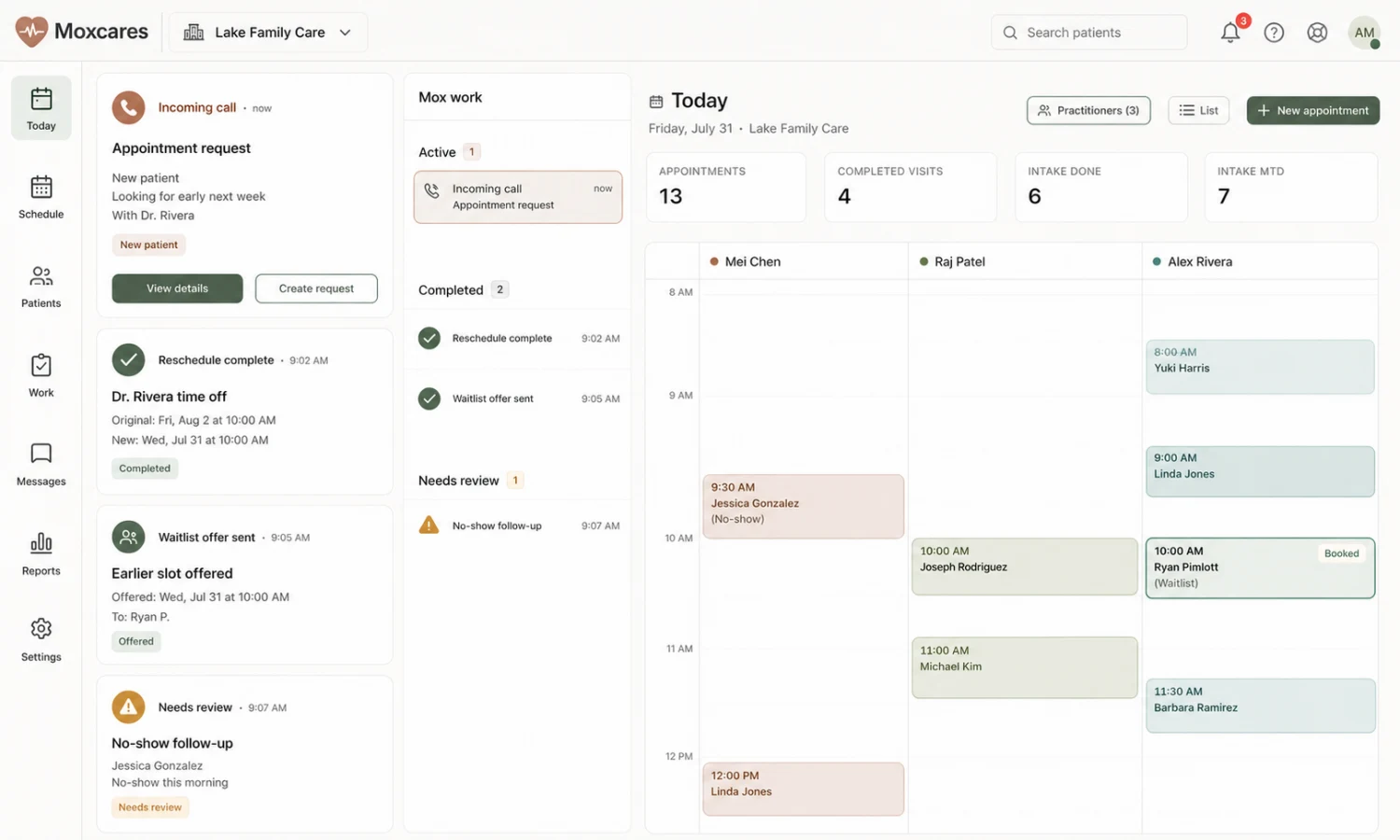
Patients book appointments online, by text, or by calling your clinic number — Mox handles the conversation end to end.
The accepted time returns to the schedule, with the outcome visible to staff.
Illustrative workflow. Your practice sets the rules, permissions and human handoffs.
What we built
Patients book, reschedule, and confirm from anywhere. Intake flows straight into the chart. Emergency calls are routed and documented. Compliance is built in, not bolted on.
Patients book appointments online, by text, or by calling your clinic number — Mox handles the conversation end to end.
Voice calls are routed and answered by Mox. Patients reschedule, confirm, or ask routine questions without waiting for a human.
Set staff handoff and after-hours rules for administrative requests. Clinical advice and emergency response stay with qualified people.
Booking, intake and arrival status stay connected in Moxcares. Keep your EHR with a reviewed handoff, or bring clinical work onto the same platform.
What you get
Per-practitioner calendars, visit types, buffers, cutoffs, and blackout days. Patients see only what you actually want them to see.
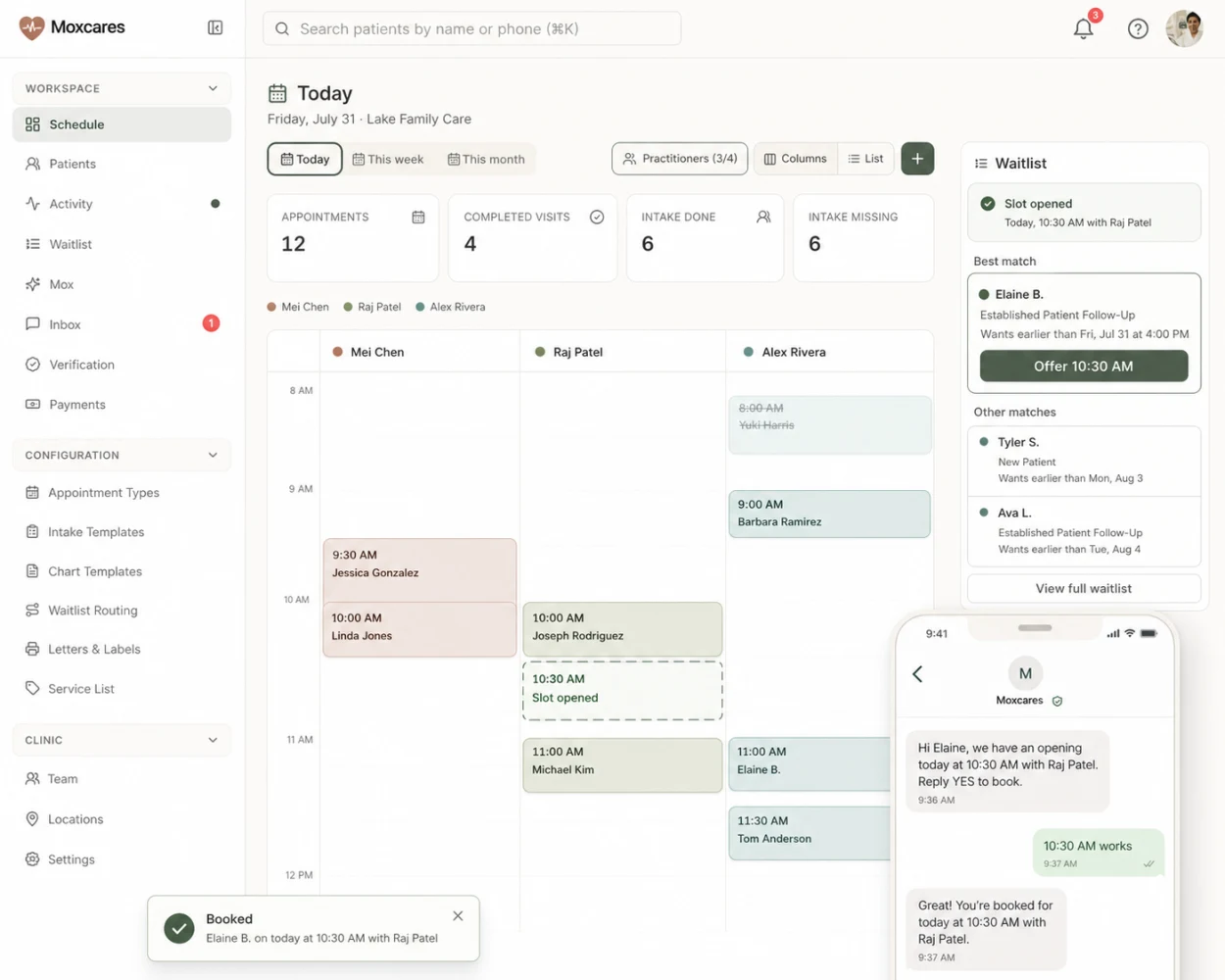
When someone cancels, Mox texts the right waitlisted patients in the right order — first reply gets the slot. No more front-desk phone-tag.
Patients text back to move an appointment. Mox proposes real open slots, confirms, and updates the calendar. No portal login required.
Route booking by location, provider, or visit type. Groups see every clinic on one screen; owners get roll-up utilization out of the box.
Patients confirm arrival from their phone. The front desk sees a clean queue instead of a lobby full of clipboards.
Tell Mox in one sentence. It clears the calendar, notifies affected patients, and offers them the next open slot — with your approval.
Why this is different
Not just a booking link. Mox runs the waitlist, handles reschedule conversations, follows up with patients, and keeps calendars synced across every location — so your staff can focus on the people in front of them.
The waitlist that actually works
Every provider has a live waitlist ranked by urgency, visit type, and preference. When a slot opens, Mox reaches out in order — text first, in the patient's language — and locks in the first confirmed reply. Your front desk sees a filled slot, not a to-do list.
FIT THE SOLUTION TO YOUR PRACTICE
Use these patient-facing workflows around the EHR your team already knows. Move clinical work to Moxcares when that becomes the right next step.
AI front desk, patient engagement and a reviewed handoff to your clinical system.
Patient engagement and our EHR, with optional clinical and revenue modules.
Scribing, payments, verification and claims are optional paid modules. Plan inclusions, usage and module requirements vary. See plans and add-ons

Create a patient inquiry follow-up workflow with clear statuses, appropriate contact, booking checks and a staff owner when an enquiry needs help.

Build a patient waitlist that helps fill cancelled appointments. Set matching rules, send clear offers and confirm bookings without creating duplicate visits.

Call flows, human handoffs, test scenarios and a downloadable pilot scorecard.
YOUR PRACTICE. YOUR PACE.
Bring a workflow your team wants to improve. We’ll show the next steps with Moxcares, whether you keep your EHR or use our full platform.
Show me my workflowA focused conversation. A practical next step.