
Clinical records that travel together.
C-CDA imports support patients, problems, medications, allergies, notes and documents. Actual completeness depends on what the source system includes in its export.
ADOPTION & GROWTH
You do not need a leap-of-faith replacement plan. Start with the work you want to improve, understand the data you can move and agree on the right rollout for your practice.
STEP 01
Review your current system, export options, critical workflows and the tools you expect to keep. Agree on the initial scope and what success should look like.
Explore each step. Your team stays in control.
HOW THE WORK MOVES
A useful implementation plan names the dependencies before the first day of use.
Review your current system, export options, critical workflows and the tools you expect to keep. Agree on the initial scope and what success should look like.
Use C-CDA to move supported patient and clinical records. Configure templates and check representative imported charts before relying on them in daily work.
Walk your team through its real tasks, resolve gaps and plan go-live support. The timing follows data readiness, configuration and practice requirements—not a blanket promise.
BUILT INTO THE WORKFLOW
The important question is not just whether data can be imported. It is whether your team can find and use the right information afterwards.
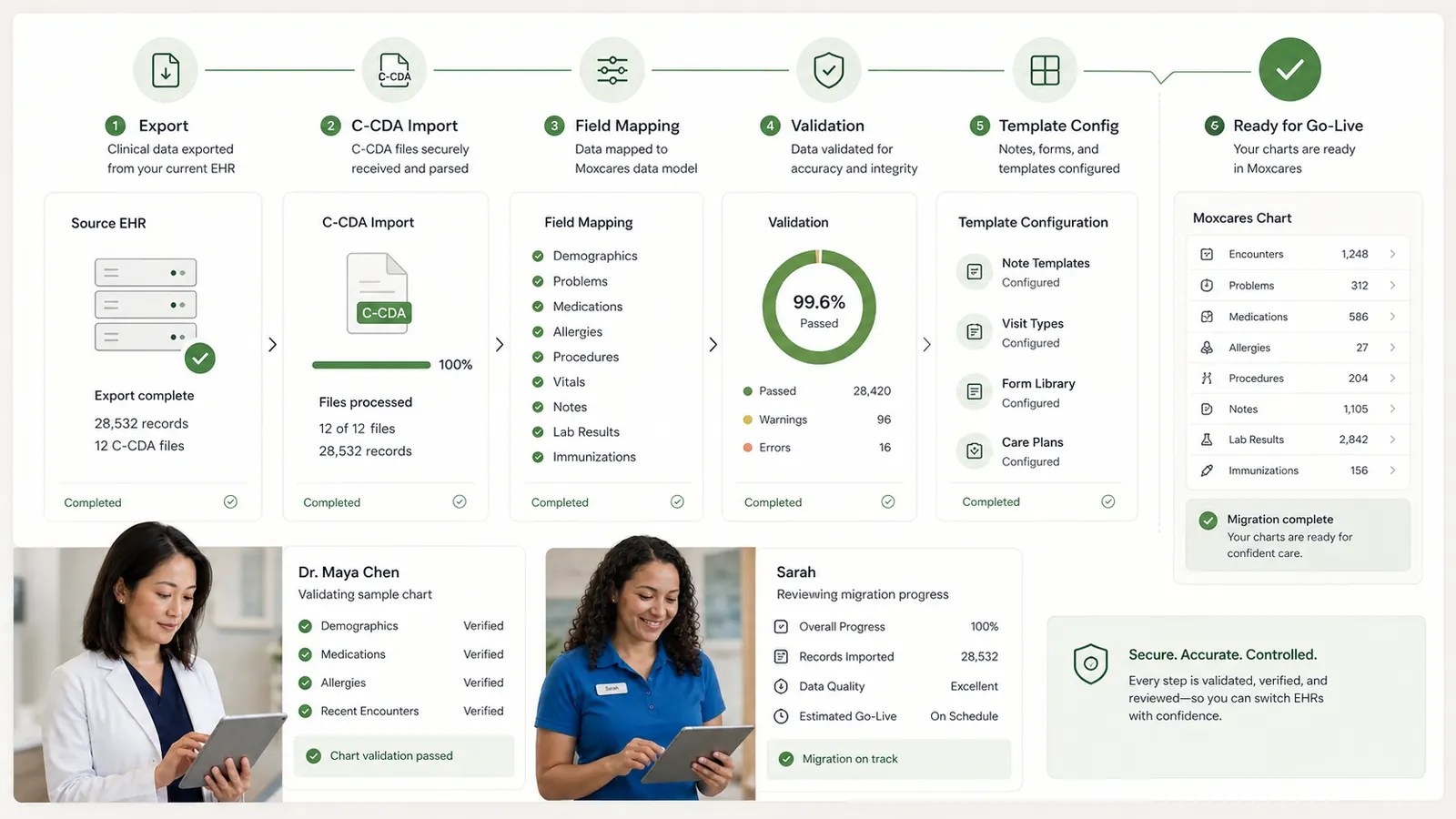
C-CDA imports support patients, problems, medications, allergies, notes and documents. Actual completeness depends on what the source system includes in its export.
Review sample records and templates with your team. Identify missing information, resolve mapping questions and agree on how any historical exceptions will be handled.
Discuss the workflows you want to start with and any systems you plan to retain. We will confirm supported connections and handoffs rather than assume every tool integrates automatically.
CLEAR RESPONSIBILITIES
Source-system exports, data quality and workflow needs affect scope and timing. We will review those dependencies with you before committing to a migration plan or claiming a particular connection is available.
Explore the Trust CenterBEFORE YOU DECIDE
No. Start by discussing your priority workflow and retained systems. We will establish which handoffs are supported and what a staged adoption would require.
C-CDA import supports key patient and clinical information. We need to review your source system’s export and validate representative records to confirm coverage.
Timing depends on the export, data volume and quality, configuration, and training needs. We will agree on a realistic schedule after reviewing your starting point.
Historical access and retention should be part of the transition plan. We will review the imported content and any information that may need to remain accessible in your previous system.

Why leaving a decades-old practice management system is nothing like clinics fear.

Implementation, migration, training, overlap — the full line-by-line switching bill.

Separate C-CDA import from ongoing sync, then check fields, permissions and validation.
YOUR PRACTICE. YOUR PACE.
Bring your toughest workflow. We’ll show you how Moxcares can help—and what moving over would look like.
Show me my workflowA focused conversation. A practical next step.