
A FAMILIAR SCENARIO
A patient pays. The team still has to connect the payment.
- Send a balance reminder.
- Match the transaction to the visit.
- Update the receipt and remaining balance.
PATIENT PAYMENTS
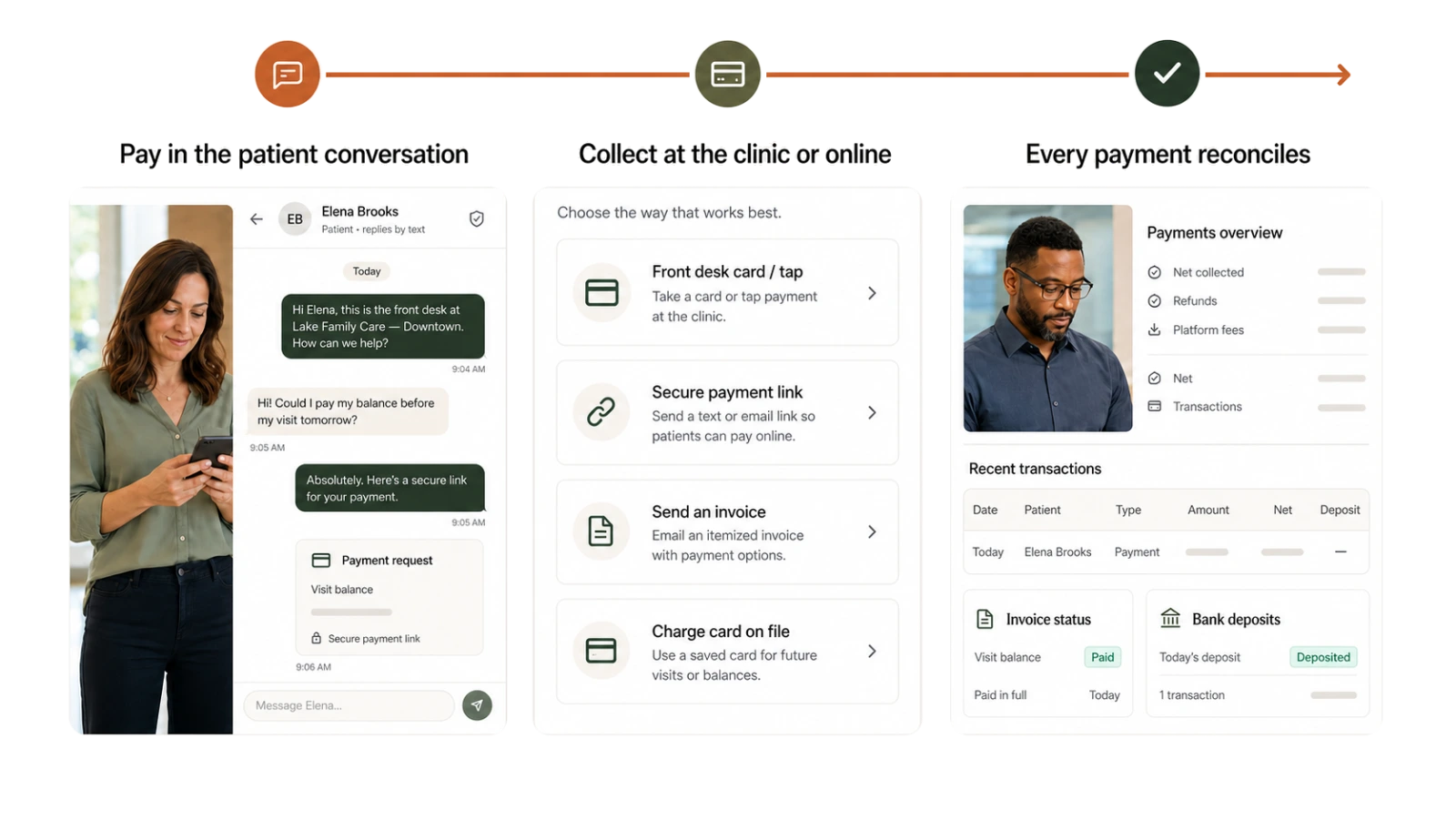
Send a secure payment link, collect at the clinic or use an authorized card on file. Keep each payment connected to the visit, invoice, receipt and remaining balance.
SEE WHAT CHANGES
Staff should not have to collect a payment in one tool and reconstruct it in another.
A FAMILIAR SCENARIO
WITH MOXCARES
Start with the amount due on the connected visit and invoice. Send a secure link in the patient conversation or collect at the clinic.
The collection, invoice and receipt remain part of one payment workflow. Authorized staff control adjustments.
Illustrative workflow. Your practice sets the rules, permissions and human handoffs.
BUILT INTO THE WORKFLOW
Review the day without rebuilding a ledger. See collections, outstanding balances, fees, refunds, net amounts and deposits, then download a transaction report.
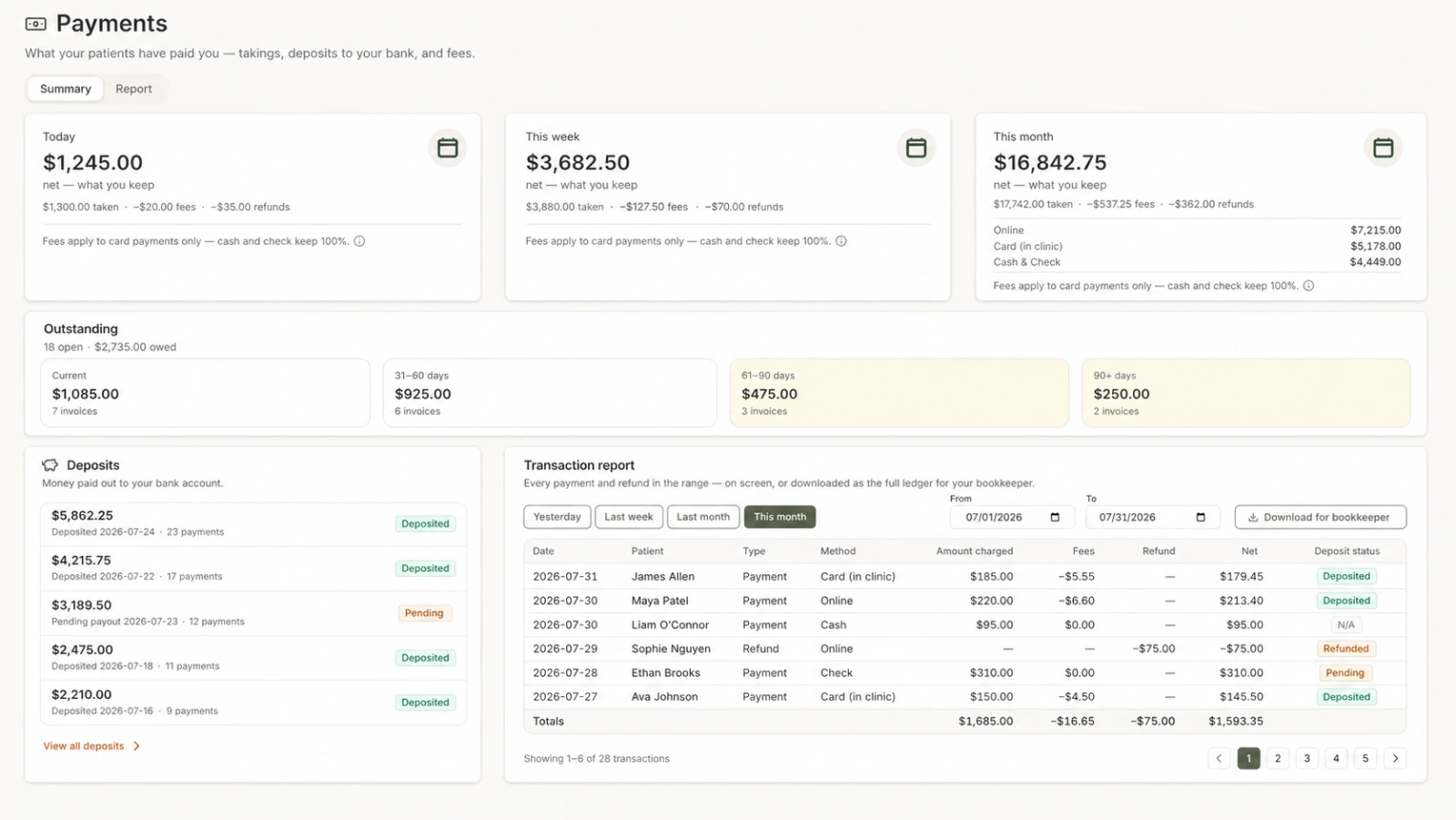
Send balance reminders and answer patient questions in the existing conversation, with a clear record for staff.
Capture cash and check against the invoice even though those funds are not processed by Moxcares. Supported readers handle clinic card payments.
When RCM posts the payer response, patient responsibility stays tied to the same encounter and invoice.
SEE IT IN PRACTICE
See a patient pay by link and the clinic track the payment, receipt and connected balance.
See a patient pay by link and the clinic track the payment, receipt and connected balance.
CLEAR RESPONSIBILITIES
Moxcares retains the payment references and status needed for clinic work—not raw card numbers. Card-on-file use requires patient authorization; refunds, adjustments and consequential financial actions require an authorized person. Clinical information is kept out of payment metadata.
Explore the Trust CenterFIT THE SOLUTION TO YOUR PRACTICE
Use selected revenue workflows alongside your current EHR, or connect them to Moxcares clinical work. We confirm module requirements and the handoff during setup.
AI front desk, patient engagement and a reviewed handoff to your clinical system.
Patient engagement and our EHR, with optional clinical and revenue modules.
Scribing, payments, verification and claims are optional paid modules. Plan inclusions, usage and module requirements vary. See plans and add-ons
BEFORE YOU DECIDE
Yes. Patients can open a secure payment link without creating a Moxcares portal account.
Yes. Moxcares supports Tap to Pay on a compatible iPhone and supported Stripe Terminal hardware.
Raw card credentials should remain in Stripe's payment environment. Moxcares stores the references and status needed for the clinic's payment workflow.
Yes, when the patient has provided appropriate authorization. The payment credential is stored by Stripe.
Yes. Cash and check can be recorded against the visit and invoice even though Moxcares does not process those funds.
Authorized staff can refund or adjust eligible transactions. Refund activity should update the invoice, patient balance and report together.
No. Consequential financial actions require an authorized person.
The payer response determines patient responsibility inside the RCM workflow. The payment is then applied to the connected invoice and patient balance.

RCM charges 4–9% of collections. Modern clearinghouse rails make flat pricing possible.

An honest way to price a missed slot — and what actually brings the rate down.

A practical ownership map, claim follow-up process and downloadable weekly review worksheet.
YOUR PRACTICE. YOUR PACE.
Bring a workflow your team wants to improve. We’ll show the next steps with Moxcares, whether you keep your EHR or use our full platform.
Show me my workflowA focused conversation. A practical next step.